Unity meets Rust – Building the Perfect Development Setup
Written by

Chapter
Share article
Category
I spend a huge amount of time not building games. This includes time spent in my actual work (not games), as well as all those times I try to sneak into gamedev as a hobby, only to be quickly sidetracked to bikeshed the most niche of issues anyone could come up with.
This time, I decided I wanted to not build a game, not just in a framework, but in two completely different stacks at the same time. There are actually some high-level reasons why someone might want to do that, but I'll leave those for a future post. This one is for the misguided and purely technical timesinks.
The good news is that while I don't have anything resembling a finished game, I do have a working development environment that gives me the best of both worlds: the rapid iteration of Rust development with the visual power of Unity.
The setup
I was conflicted between Unity, where I'd have to deal with C# and a GUI-driven workflow, or Rust and Bevy, where I'd be in much more familiar territory, but without the prototyping flexibility you typically want while trying to figure out what you're building.
So naturally, I picked both.
I decided it would be fun to explore interop between the two sides: using Rust and Bevy to build the core game logic, completely decoupled from any rendering and input devices, and plug that into Unity, where I'd handle those details, which is the part I actually prefer a GUI editor for.
This works better for certain types of games, such as puzzle or turn-based, where everything is deterministic, and we don't have to deal with physics, real-time, and RNG to add noise to our system.
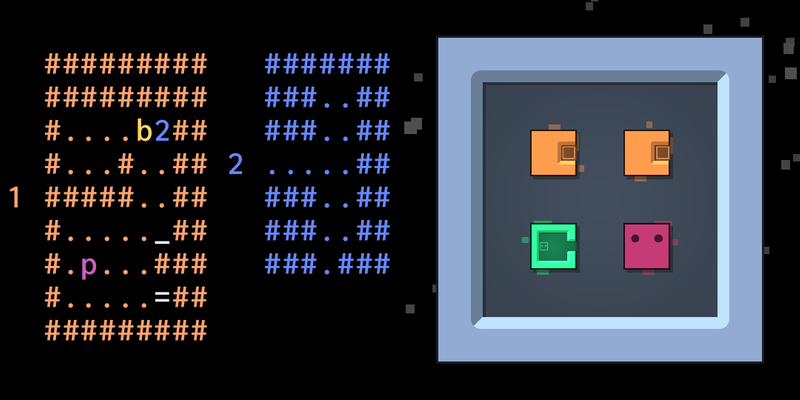
Patrick’s Parabox is a great example of this decoupling, with two different rendering styles: the regular 2D one, and an ASCII one.
But how can we achieve this?
FFI
To get two languages to talk to each other, the Foreign Function Interface (FFI) is the usual approach. For Rust -> Unity C#, this looks like this:
#[unsafe(no_mangle)]
pub extern "C" fn add(u32 x, u32 y) -> u32 {
    x + y
}
using System.Runtime.InteropServices;
[DllImport("game_core")]
private static extern int add(int x, int y);On C#'s side, we already get cross-platform for free (almost). Depending on which system we target, DllImport will look for the correct library type.
On Rust's side, we need a more elaborate setup. Depending on the target, we need to build the Rust library with different target triplets and crate types:
| Platform | Target | Crate type |
|---|---|---|
| Linux (x86) | x86_64-unknown-linux-gnu | cdylib |
| Android (ARM64) | aarch64-linux-android | cdylib |
| Windows | x86_64-pc-windows-gnu | cdylib |
| macOS* | universal-apple-darwin | cdylib |
| iOS* | aarch64-apple-ios | staticlib |
| WebGL | wasm32-unknown-unknown | staticlib |
*I'm not an Apple user, so I haven't fully tested the setup for this.
While the target triplet is well supported, it's actually tricky to compile the same crate for different combinations of target and crate type. cargo build does not support that, so we need to go down one level of abstraction:
cargo rustc --target x86_64-unknown-linux-gnu --crate-type cdylibRust and Wasm Features
There are additional quirks to deal with regarding WebGL. Rust 1.87 introduced Wasm features that, apparently, Unity's built-in compiler cannot yet handle. I had problems with bulk-memory in particular.
The workaround is to add additional compilation options to disable those features:
export RUSTFLAGS=-Ctarget-cpu=mvp
cargo +nightly build -Zbuild-std=panic_abort,std --target wasm32-unknown-unknown
Additionally, importing the Wasm module into Unity is a special edge case.
Cross-platform C# wrapper
Since we now have a mix of dynamic and static libraries, depending on the architecture, the process of loading them into Unity is a bit more complex:
#if !UNITY_EDITOR && (UNITY_IOS || UNITY_WEBGL)
  public static string libName = "__Internal";
#else
  public static string libName = "core";
#endif

[DllImport(libName)]
private static extern int add(int x, int y);
Live-reloading
While Unity's workflow is not the fastest, live-reload is still a thing: Whenever you change one of its resources or scripts, it detects and auto-loads the new resource in the editor. This is not the case for external libraries, though.
They're meant to be developed outside of the game development process, placed in Assets/Plugins, and. Unity isn't expecting us to actively change them over time.
But we can trick it into doing so by dynamically changing the library name (perhaps with an incrementing version number), effectively treating it as a brand new resource to load. Most likely, over a long work session, old versions of the library will linger in memory. But given their small size, this shouldn't realistically be a problem anytime soon. And it's still a win over having to restart the editor on every single library change.
Ultimately, this is what I ended up with as the C# library loading logic:
public class Core {

    public const string version = "0-1-0-00078";

#if UNITY_WEBGL
    public const string libName = "__Internal";
#else
    #if UNITY_ANDROID
        public const string target = "android";
    #elif UNITY_IOS
        public const string target = "ios";
    #elif UNITY_STANDALONE_OSX
        public const string target = "macos";
    #elif UNITY_STANDALONE_WIN
        public const string target = "windows";
    #else
        public const string target = "native";
    #endif

    #if UNITY_EDITOR || DEVELOPMENT_BUILD
        public const string mode = "debug";
    #else
        public const string mode = "release";
    #endif

    public const string libName = "core_" + target + "_" + mode + "_" + version;
#endif

    [DllImport(libName)]
    public static extern int add(int left, int right);
}
Putting it all together
My build script started as a bash script that quickly grew out of control. It is now built in Rust itself, using cargo-xtask, and handles:
- building my computer's native target by default (for Unity Editor development);
- building all other targets when asked explicitly, for testing on WebGL or on my phone;
- debug and release builds;
- includes an incrementing version number for each subsequent build. The
string versionin the C# code is automatically updated as well.
$ cargo xtask build
   Compiling xtask v0.1.0 (/home/naps62/projects/unity-meets-rust/crates/xtask)
    Finished `dev` profile [unoptimized + debuginfo] target(s) in 0.26s
     Running `target/debug/xtask build`
🔧 Building Core Libraries

📋 Generating version... v0-1-0-00081

🦀 Building Rust libraries in debug

Building android
    Finished `dev` profile [unoptimized + debuginfo] target(s) in 0.01s

Building native
    Finished `dev` profile [unoptimized + debuginfo] target(s) in 0.01s

Building webgl
    Finished `dev` profile [unoptimized + debuginfo] target(s) in 0.03s

📦 Copying artifacts:
   android Assets/Plugins/Android/libcore_android_debug_0-1-0-00081.so
   native Assets/Plugins/libcore_native_debug_0-1-0-00081.so
   webgl Assets/Plugins/WebGL/core.a
The result is a single cohesive repo where I can continuously work on both the Rust core and the Unity side, and get a mostly seamless experience. It should be noted, a lot of these ideas were adapted/improved upon from resources I found along the way, particularly this post by Ricardo Gameiro.
Now I just have to actually build something with it!